Monthly Archives: March 2008
[How to] Transparency to mask
When you open an PNG file or make an layer with transparents pixel and when you wish convert the transparent layer to opaque layer with mask, you can’t.
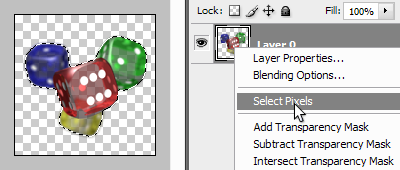
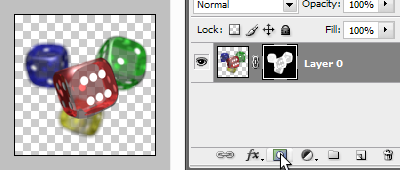
Photoshop only let select pixel (with transparency) and create mask with selection where selected is white and unselected is black (for value between selected and unselected is gray more or less white or black). See step 1.
But you can’t remove transparency of pixel on layer (set transparency to 100%)
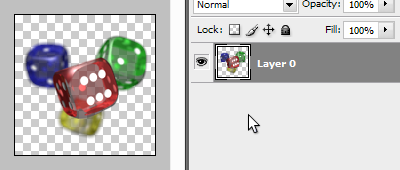
For do that in Photohop, you need a 3rd part filter: d-xparen plugin. Download and place d-xparen.8bf in Photoshop plugin directory. (On Window, you need to add to your system32 folter MSVCRT10.DLL for supporting this filter).
You can also do this with ExtendScript …
Step 1: Select transparent pixels
Step 2: create mask (alpha channel) with selection
Step 3: Apply detransparent filter
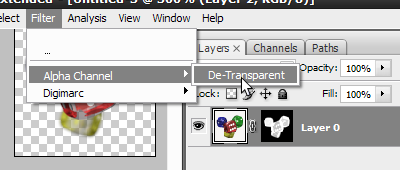
Final
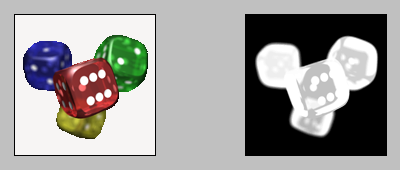
Now you have converted your transparent layer to opaque layer with mask !
Resources:
Impossible de réconcilier int et String – Flash Bug
Taper (1 || "").toString(); dans le code d’une classe ou dans la timeline et compiler …
Ca donne un erreur 1068 : Impossible de réconcilier int et String.
D’après la doc ça doit donner “int et String ne peuvent pas être rapprochés.”
A mon avis c’est un “bug” du compileur qui ne fait pas de check de ce qu’il y a dans les parenthèses. Le VM elle quand elle vois ça elle sais pas si toString c’est de int, de String ou de leur parent Object.
Pour résoudre le problème suffit de forcer la conversion dans un type définit :
Object(1 || "").toString();